
Pkl: Apple's Configuration Language for Type-Safe Config
Pkl: Apple's Configuration Language for Type-Safe Config
Photo by Daniil Komov on Unsplash
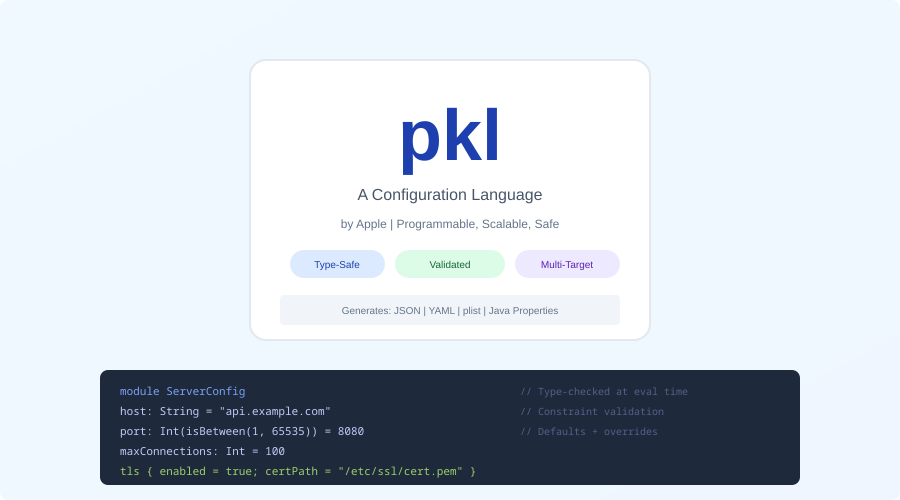
Configuration files are a quiet source of production incidents. A YAML file with a wrong indentation level. A JSON file missing a required field. A Terraform variable set to "true" (string) instead of true (boolean). These bugs are invisible until deployment, survive code review because humans are bad at spotting structural errors in data files, and often take down production because configuration is loaded at startup with no validation.
Pkl (pronounced "pickle") is a configuration language created by Apple and released as open source in early 2024. It lets you write configuration with types, validation, defaults, and documentation -- then generate JSON, YAML, TOML, XML, or property files as output. Your source of truth is a .pkl file with full type safety. Your deployment artifacts are the plain config files your tools already expect.
Why a Configuration Language?
The standard approach to configuration is one of:
- Raw YAML/JSON/TOML: No types, no validation, no defaults, no composition. Works until it doesn't.
- JSON Schema: Adds validation to JSON but is verbose, hard to write, and disconnected from the config itself.
- Template engines (Helm, Jinja): String interpolation over YAML. Produces syntactically valid output by accident. Type errors become runtime errors.
- General-purpose languages (TypeScript, Python): Overkill for config. You get types, but also Turing completeness, dependency management, and a build step.
Pkl occupies the sweet spot: it has types, validation, and composition without being a general-purpose programming language. It is designed specifically for generating configuration files.
Installation
macOS
brew install pkl
Linux
curl -L -o pkl https://github.com/apple/pkl/releases/latest/download/pkl-linux-amd64
chmod +x pkl
sudo mv pkl /usr/local/bin/
Via SDKMAN
sdk install pkl
Verify
pkl --version
# Pkl 0.27.x (or later)
Your First Pkl File
Create server-config.pkl:
/// Configuration for the web server
port: UInt16 = 8080
host: String = "0.0.0.0"
maxConnections: UInt = 1000
readTimeoutSeconds: UInt = 30

tls {
  enabled: Boolean = false
  certPath: String?
  keyPath: String?
}

logging {
  level: "debug"|"info"|"warn"|"error" = "info"
  format: "json"|"text" = "json"
  outputPath: String = "/var/log/app/server.log"
}
Generate JSON:
pkl eval server-config.pkl -f json
Output:
{
  "port": 8080,
  "host": "0.0.0.0",
  "maxConnections": 1000,
  "readTimeoutSeconds": 30,
  "tls": {
    "enabled": false,
    "certPath": null,
    "keyPath": null
  },
  "logging": {
    "level": "info",
    "format": "json",
    "outputPath": "/var/log/app/server.log"
  }
}
Generate YAML:
pkl eval server-config.pkl -f yaml
The same Pkl source produces any output format. Change the flag, get a different format.
Want more languages guides? Get guides like this in your inbox — DevTools Guide delivers one free deep-dive every week.
Type System
Pkl's type system is what makes it worth using over raw YAML. Types catch errors at evaluation time, before your configuration reaches production.
Primitive Types
name: String = "my-app"
port: UInt16 = 8080           // 0-65535
replicas: UInt = 3            // non-negative integer
cpuLimit: Float = 1.5
debug: Boolean = false
String Literals (Enums)
environment: "dev"|"staging"|"prod" = "dev"
logLevel: "debug"|"info"|"warn"|"error" = "info"
Assigning environment = "production" is a type error. No more misspelled environment names.
Nullable Types
// This field is optional
apiKey: String?

// This field is required (no default, no null)
databaseUrl: String
Collections
allowedOrigins: Listing<String> = new {
  "https://example.com"
  "https://api.example.com"
}

headers: Mapping<String, String> = new {
  ["Content-Type"] = "application/json"
  ["X-Request-Id"] = "auto"
}
Constrained Types
port: UInt16(this >= 1024) = 8080  // No privileged ports
replicas: UInt(this >= 1 && this <= 10) = 3
name: String(length >= 1 && length <= 63) = "my-app"  // DNS-safe
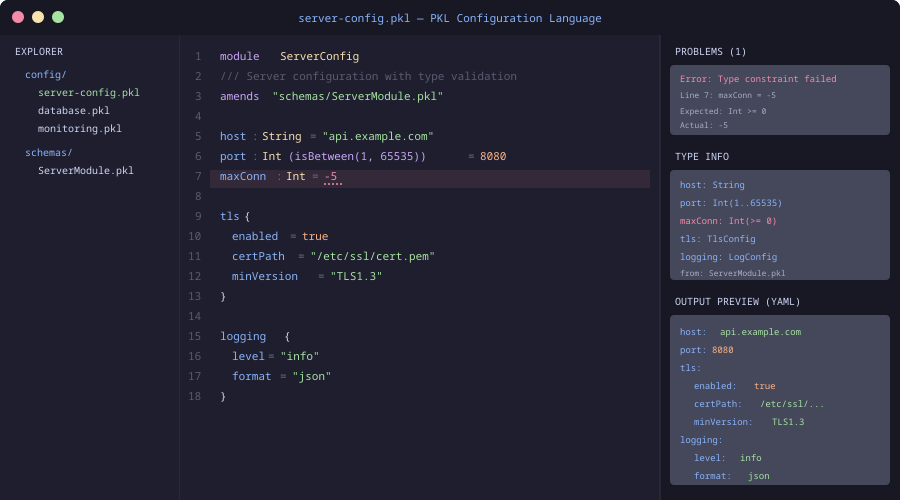
Constraints are checked at evaluation time. If someone sets port = 80, Pkl fails with a clear error message explaining the constraint.
Classes and Schemas
For complex configuration, define reusable schemas:
class DatabaseConfig {
  host: String
  port: UInt16 = 5432
  name: String
  user: String
  password: String
  pool {
    minSize: UInt = 2
    maxSize: UInt(this >= minSize) = 10
    idleTimeoutSeconds: UInt = 300
  }
  ssl: Boolean = true
}

class CacheConfig {
  host: String
  port: UInt16 = 6379
  db: UInt(this <= 15) = 0
  ttlSeconds: UInt = 3600
}

database: DatabaseConfig = new {
  host = "db.internal"
  name = "myapp"
  user = "app"
  password = "REPLACE_ME"
}

cache: CacheConfig = new {
  host = "redis.internal"
  ttlSeconds = 1800
}
The pool.maxSize constraint (this >= minSize) is a cross-field validation. You cannot set maxSize lower than minSize. This kind of constraint is impossible in YAML and awkward in JSON Schema.
Amending (Overrides)
Pkl's amends keyword lets you create environment-specific overrides without duplicating the base configuration:
Base config (base-config.pkl):
appName = "payment-service"
port = 8080
replicas = 1
database {
  host = "localhost"
  port = 5432
  name = "payments_dev"
}
logging {
  level = "debug"
  format = "text"
}
Production override (prod-config.pkl):
amends "base-config.pkl"

replicas = 5
database {
  host = "db.prod.internal"
  name = "payments"
}
logging {
  level = "warn"
  format = "json"
}
pkl eval prod-config.pkl -f yaml
The production config only specifies what differs from base. Everything else is inherited. This eliminates the copy-paste drift that plagues environment-specific YAML files.
Generating Kubernetes Manifests
Pkl is particularly effective for Kubernetes configuration, where the YAML is deeply nested and error-prone:
module k8s

class Deployment {
  apiVersion: String = "apps/v1"
  kind: String = "Deployment"
  metadata: Metadata
  spec: DeploymentSpec
}

class Metadata {
  name: String
  namespace: String = "default"
  labels: Mapping<String, String>?
}

class DeploymentSpec {
  replicas: UInt(this >= 1) = 1
  selector: Selector
  template: PodTemplate
}

// ... more type definitions ...

output: Deployment = new {
  metadata = new {
    name = "api-server"
    namespace = "production"
    labels = new {
      ["app"] = "api-server"
      ["version"] = "v2.1.0"
    }
  }
  spec = new {
    replicas = 3
    selector = new {
      matchLabels = new {
        ["app"] = "api-server"
      }
    }
    template = new {
      // ...
    }
  }
}
Apple provides official Pkl packages for Kubernetes, so you do not need to define these types yourself:
import "package://pkg.pkl-lang.org/pkl-k8s/[email protected]#/api/apps/v1/Deployment.pkl"

output = new Deployment {
  metadata = new {
    name = "api-server"
    namespace = "production"
  }
  spec = new {
    replicas = 3
    // Full type safety and autocomplete
  }
}
Editor Support
IntelliJ / VS Code
Pkl has official plugins for both editors, providing:
- Syntax highlighting
- Type checking and error reporting
- Autocomplete for fields and types
- Go-to-definition for classes and imports
- Inline documentation
Neovim
Tree-sitter support exists via tree-sitter-pkl. LSP integration works through the Pkl Language Server.
Pkl vs. Alternatives
Pkl vs. CUE: CUE is another configuration language with types and validation. CUE uses a constraint-based system inspired by logic programming, which is powerful but harder to learn. Pkl uses a more conventional object-oriented approach that feels familiar to most developers. CUE has better Kubernetes ecosystem integration. Pkl has better tooling and documentation.
Pkl vs. Dhall: Dhall is a programmable configuration language with a strong type system and guaranteed termination. It is more theoretically sound than Pkl but has a steeper learning curve and a smaller community. Pkl is more pragmatic and easier to adopt.
Pkl vs. Jsonnet: Jsonnet is a data templating language from Google. It extends JSON with variables, functions, and conditionals. Jsonnet has no type system -- errors are discovered at evaluation time through runtime failures, not type checking. Pkl catches these errors statically.
Pkl vs. Helm: Helm is a Kubernetes-specific package manager that uses Go templates over YAML. Helm templates are string interpolation with no type safety. Pkl generates YAML with full type checking. If you are only doing Kubernetes config, Helm has a larger ecosystem. If you need general configuration management, Pkl is the better foundation.
Pkl vs. raw YAML + validation: You can add JSON Schema validation to YAML files. This works but creates two artifacts to maintain (the YAML and the schema), the schema language is verbose, and cross-field validation is limited. Pkl combines the config and the schema in one file.
Practical Adoption
Start small. You do not need to rewrite all your configuration in Pkl on day one:
- Pick one config file that has caused production issues or that changes frequently across environments.
- Write the Pkl equivalent with types and constraints that would have caught the issue.
- Generate the original format (JSON/YAML) from the Pkl file and verify it matches.
- Add environment overrides using
amendsfor staging and production. - Integrate into CI: Run
pkl evalin your pipeline to validate configuration on every PR.
# CI validation step
pkl eval config/prod.pkl -f yaml > /dev/null
echo "Config validation passed"
If pkl eval exits with a non-zero code, the configuration has a type error or constraint violation, and the deployment stops before bad config reaches production.
Limitations
Adoption curve: Your team needs to learn Pkl syntax. It is simpler than most programming languages, but it is still new syntax to learn.
Tooling ecosystem: Pkl is young (open-sourced in 2024). The ecosystem of packages and integrations is growing but smaller than Helm, CUE, or Jsonnet.
Build step: Raw YAML requires no build step. Pkl adds a generation step to your workflow. This is a feature (validation!) but also friction.
Not a general-purpose language: Pkl is deliberately limited. If you need complex logic in your configuration (conditional feature flags based on runtime environment, for example), you may outgrow it.
Conclusion
Configuration errors are preventable. Pkl prevents them the same way TypeScript prevents JavaScript type errors: by adding a type system to a domain that previously relied on hope and manual review. The output is the same JSON and YAML your tools expect. The input is better -- typed, validated, documented, and composable.
If your team has ever been paged because of a typo in a YAML file, Pkl is worth 30 minutes of evaluation time. Install it, rewrite one config file, and see what errors it catches that you were previously catching in production.