
Dagger: Programmable CI/CD Pipelines Written in Code
Dagger: Programmable CI/CD Pipelines Written in Code
Photo by orbtal media on Unsplash
YAML-based CI/CD pipelines have a fundamental problem: YAML is not a programming language. You cannot write functions, compose abstractions, test locally, or debug step-by-step. When your GitHub Actions workflow hits 500 lines, you are maintaining a brittle script written in a data serialization format that was never designed for control flow. You copy-paste between jobs, inline bash scripts inside YAML strings, and pray that the indentation is correct.
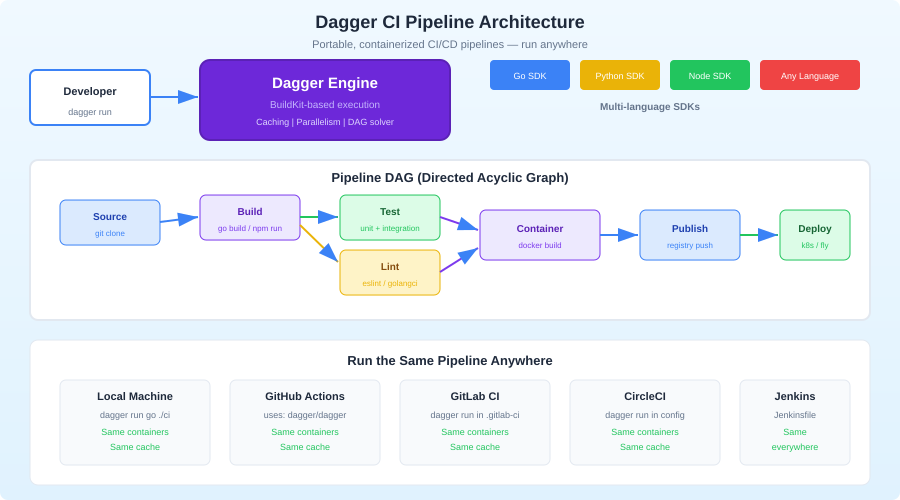
Dagger takes a different approach. Your CI/CD pipeline is a program, written in a real language -- TypeScript, Python, Go, or any language with a Dagger SDK. Pipelines run in containers for reproducibility, execute identically on your laptop and in CI, and compose into reusable modules. You test your pipeline the same way you test your application code: run it, set breakpoints, inspect state.
The Core Idea
Dagger's architecture has three layers:
Dagger Engine: A containerized runtime (built on BuildKit) that executes pipeline steps in isolated containers. It handles caching, parallelism, and artifact management.
Dagger API: A GraphQL API exposed by the engine. Every pipeline operation -- running a command, reading a file, building an image -- is an API call.
Language SDKs: Thin wrappers around the GraphQL API in TypeScript, Python, Go, PHP, and Elixir. You write your pipeline in the SDK, which translates method calls into API operations.
The key insight is that your pipeline code never runs inside the containers. Your TypeScript code runs on your machine (or CI runner) and orchestrates container operations through the API. This means you get full IDE support, type checking, and debugging for your pipeline logic.
Installation
Install the Dagger CLI
# macOS
brew install dagger/tap/dagger

# Linux
curl -fsSL https://dl.dagger.io/dagger/install.sh | sh

# Windows
choco install dagger
Initialize a Dagger Module
# TypeScript
dagger init --sdk=typescript

# Python
dagger init --sdk=python

# Go
dagger init --sdk=go
This creates a dagger/ directory in your project with the SDK scaffolding. For TypeScript, you get a dagger/src/index.ts file where your pipeline functions live.
Writing Your First Pipeline
Here is a complete CI pipeline for a TypeScript project, written in TypeScript:
// dagger/src/index.ts
import { dag, Container, Directory, object, func } from "@dagger.io/dagger";

@object()
class Ci {
  /**
   * Run the full CI pipeline: lint, test, build
   */
  @func()
  async ci(source: Directory): Promise<string> {
    // Run steps in parallel
    const [lintResult, testResult] = await Promise.all([
      this.lint(source),
      this.test(source),
    ]);

    // Build only if lint and test pass
    const buildResult = await this.build(source);

    return `Lint: ${lintResult}\nTest: ${testResult}\nBuild: ${buildResult}`;
  }

  @func()
  async lint(source: Directory): Promise<string> {
    return await this.baseContainer(source)
      .withExec(["bun", "run", "lint"])
      .stdout();
  }

  @func()
  async test(source: Directory): Promise<string> {
    return await this.baseContainer(source)
      .withExec(["bun", "test"])
      .stdout();
  }

  @func()
  async build(source: Directory): Promise<string> {
    return await this.baseContainer(source)
      .withExec(["bun", "run", "build"])
      .stdout();
  }

  private baseContainer(source: Directory): Container {
    return dag
      .container()
      .from("oven/bun:1.1")
      .withDirectory("/app", source)
      .withWorkdir("/app")
      .withExec(["bun", "install"]);
  }
}
Run this locally:
# Run the full pipeline
dagger call ci --source=.

# Run just the tests
dagger call test --source=.

# Run just the lint
dagger call lint --source=.
That dagger call command starts the Dagger engine, runs your pipeline function in containers, and streams the output. The exact same command works in CI.
Want more ci/cd guides? Get guides like this in your inbox — DevTools Guide delivers one free deep-dive every week.
Caching
Dagger caches aggressively at the layer level, similar to Docker. But you can also add explicit caches for package managers:
@func()
async test(source: Directory): Promise<string> {
  const nodeCache = dag.cacheVolume("node-modules");
  const bunCache = dag.cacheVolume("bun-cache");

  return await dag
    .container()
    .from("oven/bun:1.1")
    .withDirectory("/app", source)
    .withWorkdir("/app")
    .withMountedCache("/app/node_modules", nodeCache)
    .withMountedCache("/root/.bun/install/cache", bunCache)
    .withExec(["bun", "install"])
    .withExec(["bun", "test"])
    .stdout();
}
The cacheVolume persists across pipeline runs. First run installs all packages. Subsequent runs reuse the cache and only install changed dependencies. This is significantly faster than downloading node_modules from a CI cache archive on every run.
Services and Databases
Real CI pipelines need databases, message queues, and other services. Dagger handles this with service containers:
@func()
async integrationTest(source: Directory): Promise<string> {
  // Start a Postgres service
  const db = dag
    .container()
    .from("postgres:16")
    .withEnvVariable("POSTGRES_PASSWORD", "testpass")
    .withEnvVariable("POSTGRES_DB", "testdb")
    .withExposedPort(5432)
    .asService();

  // Start a Redis service
  const redis = dag
    .container()
    .from("redis:7")
    .withExposedPort(6379)
    .asService();

  // Run tests with services available
  return await dag
    .container()
    .from("oven/bun:1.1")
    .withDirectory("/app", source)
    .withWorkdir("/app")
    .withServiceBinding("db", db)
    .withServiceBinding("redis", redis)
    .withEnvVariable("DATABASE_URL", "postgres://postgres:testpass@db:5432/testdb")
    .withEnvVariable("REDIS_URL", "redis://redis:6379")
    .withExec(["bun", "install"])
    .withExec(["bun", "run", "test:integration"])
    .stdout();
}
Service containers start automatically when the pipeline needs them and stop when the pipeline finishes. No Docker Compose file needed. No cleanup scripts. No port conflicts.
Secrets
Never hardcode secrets in pipeline code. Dagger has a secrets API:
@func()
async deploy(source: Directory, token: Secret): Promise<string> {
  return await dag
    .container()
    .from("node:20")
    .withDirectory("/app", source)
    .withWorkdir("/app")
    .withSecretVariable("DEPLOY_TOKEN", token)
    .withExec(["npm", "run", "deploy"])
    .stdout();
}
Pass secrets from the CLI:
dagger call deploy --source=. --token=env:DEPLOY_TOKEN
Secrets are never written to the cache layer and never appear in logs.
Calling Dagger from CI
The beauty of Dagger is that your CI configuration becomes trivial. All the logic is in your Dagger module. CI just calls it.
GitHub Actions
name: CI
on: [push, pull_request]

jobs:
  ci:
    runs-on: ubuntu-latest
    steps:
      - uses: actions/checkout@v4
      - uses: dagger/dagger-for-github@v6
        with:
          verb: call
          args: ci --source=.
That is the entire CI configuration. Five lines of YAML that will never need to change because the pipeline logic lives in your codebase, not in CI config.
GitLab CI
ci:
  image: docker:latest
  services:
    - docker:dind
  before_script:
    - apk add --no-cache curl
    - curl -fsSL https://dl.dagger.io/dagger/install.sh | sh
  script:
    - dagger call ci --source=.
Any CI System
# This works everywhere
curl -fsSL https://dl.dagger.io/dagger/install.sh | sh
dagger call ci --source=.
Modules and Reuse
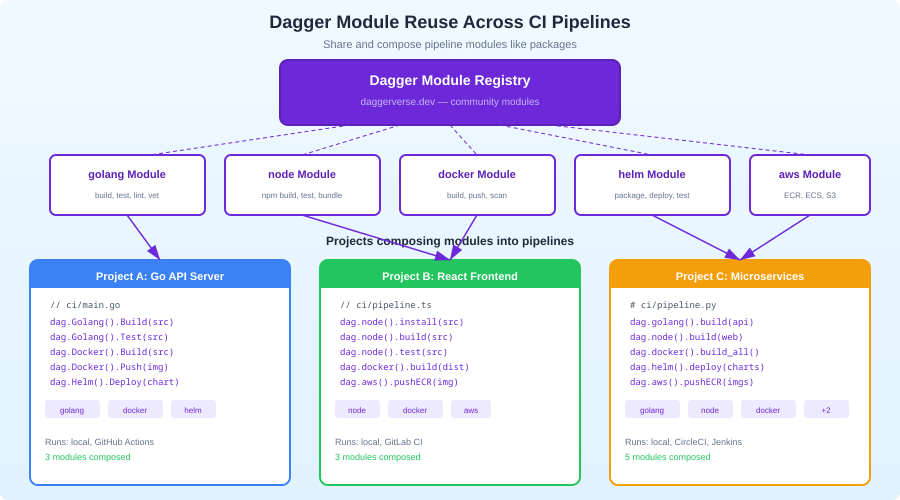
Dagger modules are the composition primitive. You can publish modules and import them in other projects:
import { dag, func, object } from "@dagger.io/dagger";

@object()
class Ci {
  @func()
  async deploy(source: Directory): Promise<string> {
    // Use a community module for Fly.io deployment
    return await dag
      .fly()
      .deploy(source, { app: "my-app", region: "sea" });
  }

  @func()
  async notify(message: string): Promise<void> {
    // Use a community module for Slack notifications
    await dag
      .slack()
      .sendMessage({ channel: "#deploys", text: message });
  }
}
Browse available modules at daggerverse.dev. Modules exist for AWS, GCP, Fly.io, Netlify, Slack, and dozens of other services.
Debugging Pipelines
This is where Dagger genuinely outshines YAML-based CI. You can debug your pipeline like any other program:
Interactive Shell
# Drop into a shell at any point in the pipeline
dagger call test --source=. terminal
This gives you an interactive shell inside the container at the state where test would run. You can inspect the filesystem, run commands manually, and figure out why something fails.
Step-by-Step Execution
Since your pipeline is code, you can add console.log statements, set breakpoints in your IDE, or run individual functions:
# Run just the lint step
dagger call lint --source=.

# Run just the build step
dagger call build --source=.
Visualize the Pipeline
dagger call ci --source=. --focus=false
The --focus=false flag shows every operation Dagger performs, including cached steps. This is invaluable for understanding caching behavior.
Dagger vs. Alternatives
Dagger vs. GitHub Actions: GitHub Actions ties your CI logic to GitHub. Dagger pipelines are portable. If you switch to GitLab or Buildkite, your pipeline moves with you. The tradeoff: GitHub Actions has a larger marketplace of pre-built actions.
Dagger vs. Earthly: Both use BuildKit and containers. Earthly uses its own DSL (Earthfile) while Dagger uses general-purpose languages. Dagger is more flexible but has a steeper learning curve. Earthly is closer to "better Dockerfiles." If you want a Makefile replacement, pick Earthly. If you want a programmable CI platform, pick Dagger.
Dagger vs. Tekton/Argo: Tekton and Argo are Kubernetes-native CI/CD systems. They are more complex, require a Kubernetes cluster, and are designed for platform teams. Dagger is for application teams that want better pipelines without managing infrastructure.
Dagger vs. plain Docker + scripts: You can achieve similar isolation with Docker and shell scripts. Dagger adds caching, parallelism, service management, and composability on top. Once your CI pipeline exceeds a few steps, the structure Dagger provides pays for itself.
Migration Strategy
You do not need to rewrite your CI overnight. The practical migration path:
- Install Dagger and init a module:
dagger init --sdk=typescript - Move one CI job to Dagger: Pick the most painful job -- usually tests with database dependencies.
- Call it from existing CI: Your GitHub Actions workflow calls
dagger call test --source=.instead of running the steps directly. - Migrate remaining jobs gradually: Move lint, build, deploy one at a time. Keep the CI YAML file as a thin wrapper.
- Remove CI-specific logic: Eventually your CI config is just
dagger call ci --source=.and all logic lives in your codebase.
Limitations
Docker dependency: Dagger requires Docker (or a compatible runtime). If your CI environment does not support Docker-in-Docker, you need to configure it.
Cold start: The first run downloads the Dagger engine image and builds your module. Subsequent runs are fast, but the initial setup adds 30-60 seconds.
Learning curve: If your team is comfortable with GitHub Actions YAML, switching to Dagger requires learning a new mental model. The payoff comes with complex pipelines -- simple "run lint, run test" workflows do not benefit much.
SDK maturity: The TypeScript and Go SDKs are mature. Python is solid. PHP and Elixir are newer and have fewer community examples.
Conclusion
Dagger makes CI/CD pipelines first-class code. You write them in a language you already know, test them locally, debug them with real tools, and run them identically everywhere. The YAML era of CI is ending -- not because YAML is bad at describing data, but because CI pipelines are programs, and programs deserve real languages.
Start with dagger init --sdk=typescript, move your most painful CI job into a Dagger function, and call it from your existing CI. You will never want to write multi-hundred-line YAML workflows again.