
Vale: Prose Linting for Technical Writers and Documentation Teams
Vale: Prose Linting for Technical Writers and Documentation Teams
Photo by Wesley Ford on Unsplash
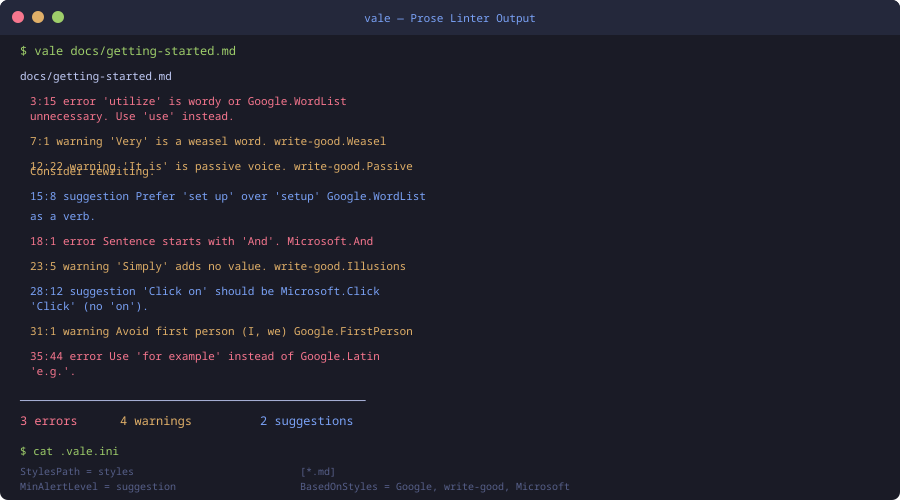
Code has ESLint. CSS has Stylelint. But what catches the errors in your documentation? Most teams rely on manual review -- someone reads the PR, spots inconsistencies in tone, flags jargon, catches the passive voice your style guide discourages. This works until it does not. Reviewers get tired. Style rules drift. New contributors write in whatever voice feels natural to them.
Vale is a linter for prose. It applies configurable rules to your Markdown, AsciiDoc, reStructuredText, HTML, or plain text files and flags violations against your style guide. It runs locally in milliseconds, integrates with every major editor, and slots into CI pipelines like any other linting step. If you maintain documentation of any size, Vale is one of the highest-leverage tools you can add to your workflow.
Why Lint Prose?
The argument for linting code is settled. Nobody debates whether a formatter or linter belongs in a project. But prose linting still feels unusual to many teams, so it is worth making the case explicitly.
Consistency across contributors: A docs site with five contributors will have five different voices without tooling. One person writes "click on the button," another writes "select the button," a third writes "press the button." Vale enforces a single vocabulary.
Catch real errors: Vale detects weasel words, passive voice, unnecessarily complex words, and jargon. These are not style preferences -- they are readability problems that make documentation harder to use.
Reduce review burden: When a linter catches "utilize" (should be "use") and "in order to" (should be "to"), reviewers spend their time on substance instead of copy editing.
Onboard new writers faster: The rules file is the style guide. New contributors run vale locally, fix violations, and internalize the team's conventions through practice rather than reading a 40-page guide nobody maintains.
Installation
macOS
brew install vale
Linux
# Snap
sudo snap install vale

# Or download the binary
wget https://github.com/errata-ai/vale/releases/latest/download/vale_Linux_64-bit.tar.gz
tar -xzf vale_Linux_64-bit.tar.gz
sudo mv vale /usr/local/bin/
Windows
choco install vale
# or
scoop install vale
Verify Installation
vale --version
# vale version 3.x.x
Configuration
Vale's configuration lives in a .vale.ini file at the root of your project. This is the minimum viable config:
StylesPath = styles
MinAlertLevel = suggestion

[*.md]
BasedOnStyles = Vale
This tells Vale to look for style rules in a styles/ directory, report everything down to suggestions, and apply the built-in Vale style to all Markdown files.
A More Practical Configuration
Real projects need more. Here is a configuration that balances strictness with usability:
StylesPath = styles
MinAlertLevel = warning

Vocab = ProjectTerms

Packages = Google, write-good, proselint

[*.md]
BasedOnStyles = Vale, Google, write-good, proselint

[*.mdx]
BasedOnStyles = Vale, Google, write-good

# Ignore code blocks entirely
BlockIgnores = (?s) *(`{3}.*?`{3})

# Ignore inline code
TokenIgnores = (`[^`]*`)

[README.md]
MinAlertLevel = error
This configuration uses three community style packages (Google's developer documentation style, write-good, and proselint), ignores code blocks and inline code (you do not want prose rules applied to your code examples), and treats README files with a lighter touch.
Installing Style Packages
vale sync
This command reads the Packages line from .vale.ini and downloads the specified styles into your styles/ directory. Run it once after cloning and again when you add new packages.
The most popular packages:
| Package | Focus |
|---|---|
Google |
Google Developer Documentation Style Guide |
Microsoft |
Microsoft Writing Style Guide |
write-good |
General prose quality (passive voice, weasel words) |
proselint |
Advice from professional writers and editors |
alex |
Catch insensitive and inconsiderate writing |
Readability |
Grade-level readability scores |
Want more editors guides? Get guides like this in your inbox — DevTools Guide delivers one free deep-dive every week.
Running Vale
Basic Usage
# Lint a single file
vale docs/getting-started.md

# Lint a directory
vale docs/

# Lint everything covered by .vale.ini
vale .
Output Formats
Vale supports multiple output formats for different contexts:
# Default (human-readable)
vale docs/

# JSON (for CI integration)
vale --output JSON docs/

# GitHub Actions compatible
vale --output line docs/

# Custom template
vale --output='{"file":"%s","line":"%d","message":"%s"}' docs/
Filtering by Severity
# Only show errors (skip warnings and suggestions)
vale --minAlertLevel error docs/

# Show everything
vale --minAlertLevel suggestion docs/
Writing Custom Rules
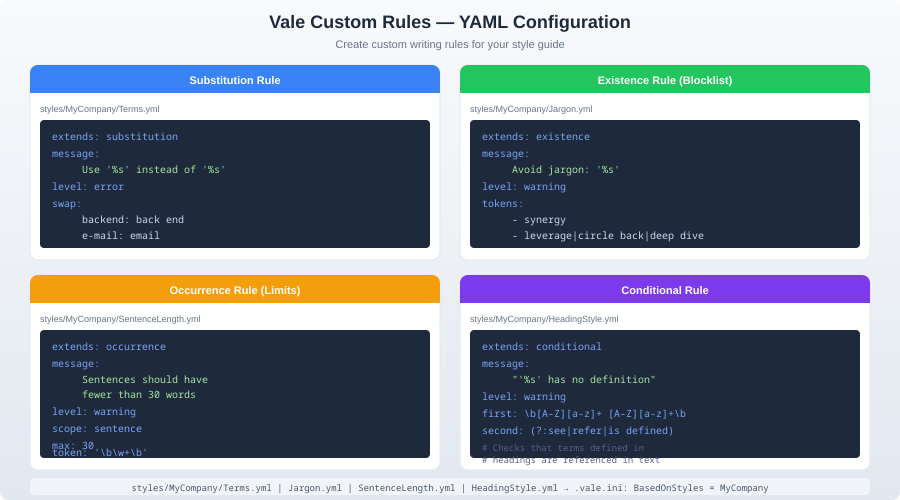
This is where Vale becomes genuinely powerful. The built-in packages cover general prose quality, but every project has domain-specific rules.
Existence Rules (Ban Words)
The simplest rule: flag a word or phrase that should not appear.
Create styles/ProjectStyle/Jargon.yml:
extends: existence
message: "Avoid jargon: '%s' -- use simpler language."
level: warning
tokens:
  - leverage
  - utilize
  - synergy
  - paradigm
  - holistic
  - "circle back"
  - "move the needle"
Substitution Rules (Replace Words)
Flag a word and suggest a replacement.
Create styles/ProjectStyle/Terminology.yml:
extends: substitution
message: "Use '%s' instead of '%s'."
level: error
ignorecase: true
swap:
  hostname: host name
  datacenter: data center
  config file: configuration file
  repo: repository
  k8s: Kubernetes
  postgres: PostgreSQL
Conditional Rules (Require Definitions)
Ensure that abbreviations are defined before use.
Create styles/ProjectStyle/Abbreviations.yml:
extends: conditional
message: "'%s' has no definition."
level: warning
first: \b([A-Z]{2,5})\b
second: \b(?:[A-Z][a-z]+ )+\(([A-Z]{2,5})\)
This flags any uppercase abbreviation that is not preceded by its expanded form in parentheses.
Occurrence Rules (Count Constraints)
Limit how often something can appear.
Create styles/ProjectStyle/Headings.yml:
extends: occurrence
message: "Too many top-level headings. Split this document."
level: warning
scope: heading.h1
max: 1
Vocabulary: Teaching Vale Your Terms
Every project has legitimate terms that generic prose linters will flag. "Kubernetes" is not a common English word. Neither is "PostgreSQL" or your product name. Vale's vocabulary system handles this.
Create styles/Vocab/ProjectTerms/accept.txt:
Kubernetes
PostgreSQL
GraphQL
TypeScript
Paperkite
DevOps
localhost
npm
pnpm
Create styles/Vocab/ProjectTerms/reject.txt:
Mongo
Webpacked
Dockerized
The accept.txt file tells Vale these words are valid. The reject.txt file flags words that should never appear. These apply across all styles.
Editor Integration
VS Code
Install the Vale VSCode extension from the marketplace. It runs Vale on every save and displays violations inline.
Add to your .vscode/settings.json:
{
  "vale.valeCLI.path": "/usr/local/bin/vale",
  "vale.valeCLI.minAlertLevel": "warning"
}
Neovim
With nvim-lint:
require('lint').linters_by_ft = {
  markdown = { 'vale' },
  text = { 'vale' },
  asciidoc = { 'vale' },
}
JetBrains IDEs
Install the Grazie Professional plugin, which includes Vale support. Or use the Vale CLI plugin from the JetBrains marketplace.
Zed
Zed has built-in Vale support. Add to your settings:
{
  "lsp": {
    "vale": {
      "binary": {
        "path": "vale"
      }
    }
  }
}
CI Integration
GitHub Actions
name: Prose Lint
on:
  pull_request:
    paths:
      - 'docs/**'
      - '*.md'

jobs:
  vale:
    runs-on: ubuntu-latest
    steps:
      - uses: actions/checkout@v4
      - uses: errata-ai/vale-action@v2
        with:
          files: docs/
          reporter: github-pr-review
The github-pr-review reporter posts violations as inline PR review comments, so writers see exactly where the problems are in the diff view.
GitLab CI
prose-lint:
  image: jdkato/vale:latest
  script:
    - vale --minAlertLevel error docs/
  only:
    changes:
      - docs/**/*.md
Pre-commit Hook
# .pre-commit-config.yaml
repos:
  - repo: https://github.com/errata-ai/vale
    rev: v3.4.0
    hooks:
      - id: vale
        args: [--minAlertLevel, error]
        files: \.(md|txt|adoc)$
This prevents prose errors from reaching the repository. Use error level for pre-commit (you do not want warnings blocking every commit) and warning level in CI.
Real-World Workflow
Here is how a documentation team typically integrates Vale:
Start with a community style: Pick Google or Microsoft as your base. These are comprehensive and well-maintained.
Add project vocabulary: Create
accept.txtwith your product terms, acronyms, and domain vocabulary.Write 3-5 custom rules: Start with terminology consistency (your product name, feature names) and banned jargon. Do not over-engineer -- you will discover what you need through real PRs.
Set CI to warning level: Run Vale in CI on every PR that touches docs. Start with warnings visible but non-blocking.
Tighten over time: After a month, promote the most commonly violated warnings to errors. Add new rules as patterns emerge from review feedback.
Never block on suggestions: Suggestions are informational. Blocking CI on suggestions will create frustration and workarounds.
Vale vs. Alternatives
Vale vs. textlint: textlint is JavaScript-based and slower. Its plugin ecosystem is smaller. However, textlint can lint code comments alongside prose, which Vale cannot. If your primary concern is documentation, Vale wins. If you want to lint JSDoc comments, consider textlint.
Vale vs. LanguageTool: LanguageTool is a grammar checker, not a style linter. It catches "their/there/they're" errors but does not enforce style guides. Use both -- LanguageTool for grammar, Vale for style.
Vale vs. Grammarly: Grammarly is cloud-based, proprietary, and expensive for teams. Vale is local, open source, and free. Grammarly catches more grammar issues. Vale catches more style issues. They serve different purposes.
Vale vs. manual review: Not a real comparison. Use Vale to handle the mechanical checks so human reviewers focus on accuracy, completeness, and clarity -- things a linter cannot judge.
Common Pitfalls
Too many rules too fast: Teams that enable every rule on day one create a wall of violations that nobody fixes. Start strict on a few rules, expand gradually.
Linting code examples: If you forget to add BlockIgnores for fenced code blocks, Vale will flag variable names and function calls as spelling errors. Always exclude code blocks.
Ignoring the vocabulary file: Every new product term triggers a false positive until you add it to accept.txt. Keep this file updated or your team will learn to ignore Vale output.
Not versioning styles: Check your styles/ directory into git. If each developer runs vale sync independently, they might get different versions. Pin versions in your config and commit the result.
Conclusion
Vale fills a genuine gap in the development toolchain. Code quality has decades of tooling. Documentation quality has been left to human reviewers and good intentions. Vale does not replace human judgment -- it handles the mechanical consistency checks that humans are bad at remembering and computers are good at enforcing.
Start with brew install vale, add a .vale.ini to your docs repo, pick a community style, and run vale sync. You will find violations in your first run. That is the point.