
SQLite for Developers: When and How to Use the World's Most Deployed Database
SQLite for Developers: When and How to Use the World's Most Deployed Database
Photo by Rob Wingate on Unsplash
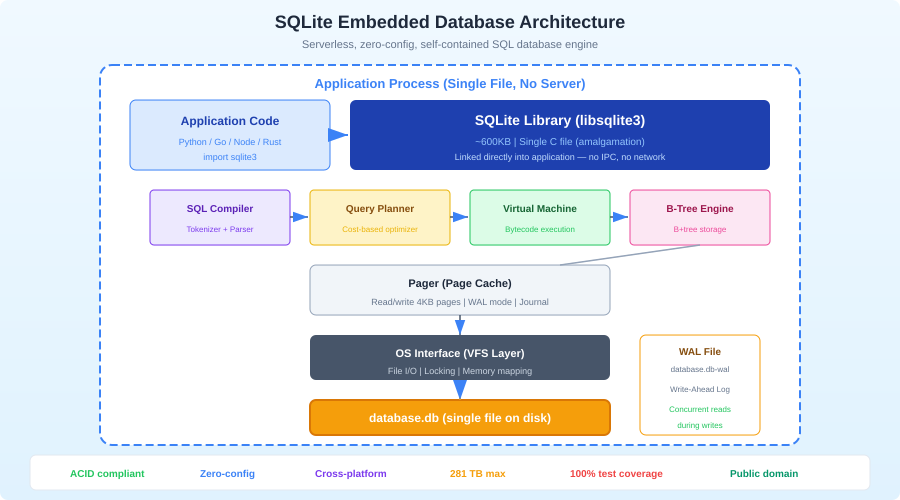
SQLite is the most widely deployed database engine in the world. It runs on every smartphone, every web browser, most operating systems, and inside millions of applications. Yet many developers dismiss it as a toy -- something for mobile apps and prototypes, not real work. This is a mistake.
SQLite is not a replacement for PostgreSQL or MySQL. It is a fundamentally different tool that solves a different set of problems. When you understand those problems, SQLite becomes one of the most useful tools in your kit. It is the right choice for application configuration, local-first software, test databases, embedded analytics, and any scenario where a client-server database adds complexity you do not need.
What Makes SQLite Different
SQLite is not a client-server database. There is no server process, no TCP connections, no authentication layer, no configuration file. The database is a single file on disk. Your application links against the SQLite library and makes function calls to read and write data. That is it.
This architecture has profound implications:
Zero administration: There is nothing to install, configure, start, stop, or monitor. The database exists when you create the file and is gone when you delete it.
Zero deployment complexity: Copy the file. That is your backup, your migration, and your deployment. You can email a database, put it in S3, or commit it to git (for small databases).
Predictable performance: No network round trips. No connection pooling. No query planner differences between your machine and production. A query that takes 2ms on your laptop takes 2ms everywhere.
Atomic transactions: SQLite implements full ACID transactions. BEGIN, COMMIT, ROLLBACK work exactly as you would expect. The journal mode ensures that a power failure mid-transaction leaves the database in a consistent state.
When to Use SQLite
Application Configuration and State
If your application stores user preferences, UI state, or configuration in a JSON file, consider SQLite instead. A JSON file works until you need to query it, update a single field without rewriting the entire file, or handle concurrent access. SQLite does all of this.
CREATE TABLE settings (
  key TEXT PRIMARY KEY,
  value TEXT NOT NULL,
  updated_at TEXT DEFAULT (datetime('now'))
);

-- Read a setting
SELECT value FROM settings WHERE key = 'theme';

-- Update atomically
UPDATE settings SET value = 'dark', updated_at = datetime('now')
WHERE key = 'theme';
Test Databases
Running tests against PostgreSQL means managing a test database server, handling migrations, ensuring isolation between test runs, and cleaning up afterward. SQLite eliminates all of this:
import { Database } from "bun:sqlite";

function createTestDb(): Database {
  const db = new Database(":memory:");
  // Run migrations
  db.exec(readFileSync("schema.sql", "utf-8"));
  return db;
}

test("create user", () => {
  const db = createTestDb();
  db.run("INSERT INTO users (name, email) VALUES (?, ?)", ["Alice", "[email protected]"]);
  const user = db.query("SELECT * FROM users WHERE email = ?").get("[email protected]");
  expect(user.name).toBe("Alice");
  // Database disappears when test ends -- no cleanup needed
});
In-memory SQLite databases are created in microseconds and destroyed automatically. Each test gets a fresh database with zero overhead.
Local-First Applications
The local-first movement builds applications that work offline and sync when connected. SQLite is the natural storage layer because it lives on the client, handles concurrent access, and is small enough to ship with any application.
Tools like cr-sqlite add CRDT-based replication to SQLite, enabling peer-to-peer sync between devices. LiteFS replicates SQLite across Fly.io nodes. Turso/libSQL extends SQLite with HTTP-based replication for edge deployments.
Embedded Analytics
If your application needs to analyze structured data without sending it to a server, SQLite is an excellent embedded analytics engine:
-- Aggregate sales by month
SELECT
  strftime('%Y-%m', sale_date) AS month,
  SUM(amount) AS total,
  COUNT(*) AS transactions
FROM sales
GROUP BY month
ORDER BY month DESC;
SQLite handles millions of rows on modern hardware. For read-heavy analytics workloads with WAL mode enabled, it can serve queries while writes happen concurrently.
Essential Configuration
Out-of-the-box SQLite works, but these pragmas make it work well for application use:
-- Enable WAL mode (Write-Ahead Logging)
PRAGMA journal_mode=WAL;

-- Set a busy timeout (wait 5s instead of failing immediately)
PRAGMA busy_timeout=5000;

-- Enable foreign key enforcement (off by default!)
PRAGMA foreign_keys=ON;

-- Normal synchronous mode (safe with WAL, faster than FULL)
PRAGMA synchronous=NORMAL;

-- Store temp tables in memory
PRAGMA temp_store=MEMORY;

-- Set page cache size (negative = KB, so -64000 = 64MB)
PRAGMA cache_size=-64000;

-- Enable memory-mapped I/O (256MB)
PRAGMA mmap_size=268435456;
Set these pragmas every time you open a connection. In most SQLite wrappers, you can configure them once at initialization:
import { Database } from "bun:sqlite";

const db = new Database("app.db");
db.exec(`
  PRAGMA journal_mode=WAL;
  PRAGMA busy_timeout=5000;
  PRAGMA foreign_keys=ON;
  PRAGMA synchronous=NORMAL;
  PRAGMA temp_store=MEMORY;
  PRAGMA cache_size=-64000;
  PRAGMA mmap_size=268435456;
`);
WAL Mode Explained
WAL (Write-Ahead Logging) is the single most important setting for application use. Without it, SQLite locks the entire database for writes, blocking all readers. With WAL:
- Readers never block writers
- Writers never block readers
- Multiple readers can operate concurrently
- Only one writer can operate at a time (but readers continue unblocked)
WAL mode persists across connections -- you set it once, and it stays until you change it.
Want more databases guides? Get guides like this in your inbox — DevTools Guide delivers one free deep-dive every week.
JSON Support
SQLite has native JSON functions that make it surprisingly capable for semi-structured data:
CREATE TABLE events (
  id INTEGER PRIMARY KEY,
  type TEXT NOT NULL,
  data TEXT NOT NULL,  -- JSON stored as text
  created_at TEXT DEFAULT (datetime('now'))
);

-- Insert JSON data
INSERT INTO events (type, data) VALUES (
  'page_view',
  json('{"url": "/pricing", "referrer": "google.com", "duration_ms": 3200}')
);

-- Query JSON fields
SELECT
  json_extract(data, '$.url') AS url,
  json_extract(data, '$.duration_ms') AS duration
FROM events
WHERE type = 'page_view'
  AND json_extract(data, '$.duration_ms') > 1000;

-- Index a JSON field for fast queries
CREATE INDEX idx_events_url ON events(json_extract(data, '$.url'));
The -> and ->> operators (added in SQLite 3.38) provide a cleaner syntax:
SELECT
  data->>'url' AS url,
  data->>'duration_ms' AS duration
FROM events
WHERE type = 'page_view'
  AND CAST(data->>'duration_ms' AS INTEGER) > 1000;
Full-Text Search
SQLite includes FTS5, a full-text search engine:
-- Create a virtual FTS table
CREATE VIRTUAL TABLE docs_fts USING fts5(title, body, content=docs, content_rowid=id);

-- Populate from an existing table
INSERT INTO docs_fts(rowid, title, body)
SELECT id, title, body FROM docs;

-- Search
SELECT
  d.id, d.title,
  snippet(docs_fts, 1, '<b>', '</b>', '...', 20) AS excerpt,
  rank
FROM docs_fts
JOIN docs d ON d.id = docs_fts.rowid
WHERE docs_fts MATCH 'sqlite AND performance'
ORDER BY rank;
FTS5 supports phrase queries, boolean operators, prefix searches, and ranking. For applications that need search without Elasticsearch, this is remarkably capable.
Performance
SQLite's performance characteristics are different from client-server databases:
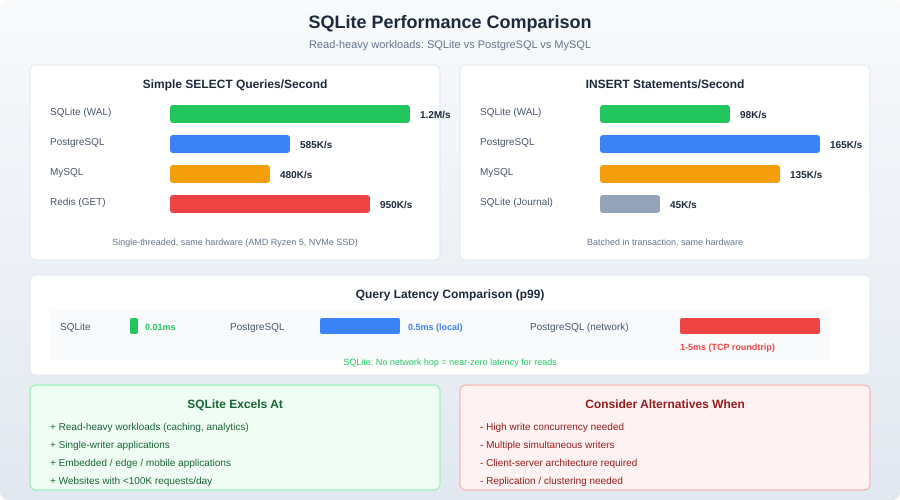
Reads are fast: Simple key lookups take microseconds. Complex queries over indexed columns with millions of rows complete in milliseconds. There is no network overhead, no query parsing overhead (with prepared statements), and no connection establishment cost.
Writes are serialized: Only one writer at a time. In WAL mode, writes do not block reads, but concurrent write attempts will queue. Throughput for write-heavy workloads tops out around 10,000-50,000 transactions per second on modern SSDs.
Bulk inserts need transactions: Inserting rows one at a time without a transaction is catastrophically slow because each insert triggers a filesystem sync. Wrap bulk operations in a transaction:
const insert = db.prepare("INSERT INTO logs (level, message) VALUES (?, ?)");

// Bad: ~50 inserts/sec
for (const log of logs) {
  insert.run(log.level, log.message);
}

// Good: ~500,000 inserts/sec
const insertMany = db.transaction((logs) => {
  for (const log of logs) {
    insert.run(log.level, log.message);
  }
});
insertMany(logs);
The difference is not 2x or 5x. It is 10,000x. Always batch writes in transactions.
When NOT to Use SQLite
SQLite is wrong for these scenarios:
High-concurrency writes: If multiple processes or threads need to write simultaneously and throughput matters, use PostgreSQL. SQLite serializes writes. One writer at a time.
Multi-server deployments: SQLite lives on one filesystem. If your application runs on multiple servers, each with its own SQLite file, they will diverge immediately. Solutions like LiteFS and Turso address this, but they add complexity that a client-server database handles natively.
Large datasets (>1TB): SQLite technically supports databases up to 281TB, but practical performance degrades with very large databases. If you are storing terabytes, use a database designed for it.
Fine-grained access control: SQLite has no user accounts, roles, or row-level security. Access control is "can you read the file?" If you need per-user permissions at the database level, use PostgreSQL.
Replication and high availability: SQLite has no built-in replication. If your database needs to survive a disk failure without data loss, you need a system with replication. Or put SQLite behind a replication layer like LiteFS.
SQLite in Production
Despite the caveats, SQLite powers production applications at scale:
Litestream provides continuous replication of SQLite databases to S3. Your application writes to a local SQLite file. Litestream streams changes to S3 in near-real-time. On failure, restore from S3 and lose at most a few seconds of data.
# Install Litestream
brew install litestream

# Replicate to S3
litestream replicate app.db s3://my-bucket/app.db

# Restore from S3
litestream restore -o app.db s3://my-bucket/app.db
Turso (built on libSQL, a fork of SQLite) provides edge-deployed SQLite with HTTP access and replication. You get a SQLite-compatible database that replicates to edge locations worldwide.
Rails 8 added official SQLite support for production, including a SQLite-backed job queue, cache, and cable (WebSocket) adapter. This is a strong signal that the industry is taking SQLite-in-production seriously.
Useful Tools
DB Browser for SQLite (sqlitebrowser): GUI for browsing and editing SQLite databases. Cross-platform, open source.
Datasette: Instantly publish SQLite databases as a browsable JSON API. Invaluable for sharing datasets and building quick internal tools.
sqlite-utils: A Python CLI and library for manipulating SQLite databases. Convert CSV to SQLite, run queries, export data -- all from the command line.
Bun's built-in SQLite: Bun includes a fast SQLite driver (bun:sqlite) that requires no npm packages. It supports prepared statements, transactions, and WAL mode out of the box.
import { Database } from "bun:sqlite";

const db = new Database("myapp.db", { create: true });
const query = db.query("SELECT * FROM users WHERE active = ?");
const activeUsers = query.all(1);
Conclusion
SQLite is not PostgreSQL and should not try to be. It is a different tool for a different set of problems. When those problems match -- local state, test databases, embedded analytics, configuration storage, local-first apps -- SQLite is not just adequate. It is the best option available. Zero deployment, zero configuration, single-file simplicity, and performance that matches or exceeds client-server databases for single-machine read-heavy workloads.
Stop defaulting to PostgreSQL for every project. Ask whether you actually need a client-server database. Often, the answer is no.